How to get an AI to haggle over a car listing for you

This guide is a scenario built on top of the AI phone assistant from my previous guide. Step 1 summarises how the base system is set up; every setting for the PBX, OpenAI GPT-Live and the tools is in "How do you get AI to make real phone calls?", linked under step 1. In the call from the video, the assistant's first offer was 100,000 lira below the listing price: 2,239,000 TL. The seller said "since we're talking to an AI" and gave his final, non-negotiable number: 2,300,000 TL. It didn't hit my target, but it got 39,000 lira off. The call took 3.5 minutes and I listened live. Below is the system step by step, including the gap I spotted in the video.
What you'll need
- A working AI phone assistant (PBX + GPT-Live). Summary in step 1, full setup in my previous guide: "How do you get AI to make real phone calls?"
- A chat model that can read images: it reads the listing screenshot and prepares the call card
- A screenshot of the listing: the price and the seller's phone must be readable in the same frame
- Two numbers: the discount you ask for first (target) and the smallest discount you'd accept (floor)
- If you'll publish the call: the other person's explicit consent
Step by step
1. Setup: build the phone assistant first
Negotiation is a scenario running on top of my phone assistant, so the assistant itself has to be in place first. The base system has seven parts, set up in this order. 1) A Linux server with Docker. 2) An Asterisk PBX running in Docker on that server. 3) A line from an operator that gives you a SIP account: mine is a Turkish 0850 business line, and the PBX connects to the operator for outbound calls only, without registering. 4) The OpenAI GPT-Live connection: GPT-Live speaks SIP natively, the PBX bridges the other person and OpenAI into one call, and I accept each session through a webhook. 5) A small call manager I wrote in Node.js: it starts the call, enforces the time limit, catches the goodbye and hangs up. 6) Background tools: my CRM does things like forwarding notes to my WhatsApp and recording a deal while the call is still going. 7) My chat assistant: it turns what I type or say into a call card. I built this base with Claude Code in two days. Every part's settings, the pitfalls I hit, the diagrams and a ready prompt to rebuild it all are in the previous guide. Once the base works, adding the negotiation scenario below takes 2-3 hours.
Keep test mode on for the first days and only call your own number. Try the negotiation scenario with demo calls to your own number before calling a real seller.
Read the setup guide: How do you get AI to make real phone calls?
2. Make negotiation its own scenario
Every call on my phone assistant starts from a scenario: a task text, a first sentence and a time limit. Negotiation got its own scenario because my general rules are written for calls where I'm the seller: normally the assistant never offers a discount on its own. In a negotiation the roles flip, and the first sentence of the instructions says so explicitly: "On this call you are the buyer; asking the other side for a discount is your job." Without that line the general rule gets in the way of the haggling. Negotiation calls are capped at 5 minutes.
3. Read the listing from a screenshot
I send the assistant the listing screenshot and say "call the owner, ask for 100k off, I'll settle for 80k". The chat model reads the title, make-model-year, mileage, listing price, city, seller name and phone from the image and prepares a call card. In the first tries it couldn't read the price or the phone, because the image went out at low detail (512 px) and small text got lost. Sending it at high detail, up to 2048 px, fixed that. If the price still can't be read, the card is created without it and the assistant asks the seller for the price on the call and confirms it.
Only take the seller's number from the listing image or from a number you type explicitly. My assistant can also reach my contacts and my CRM, so the instructions say "never take the seller's number from there". Calling the wrong person to haggle is embarrassing and a real problem.
4. Let code do the math, not the model
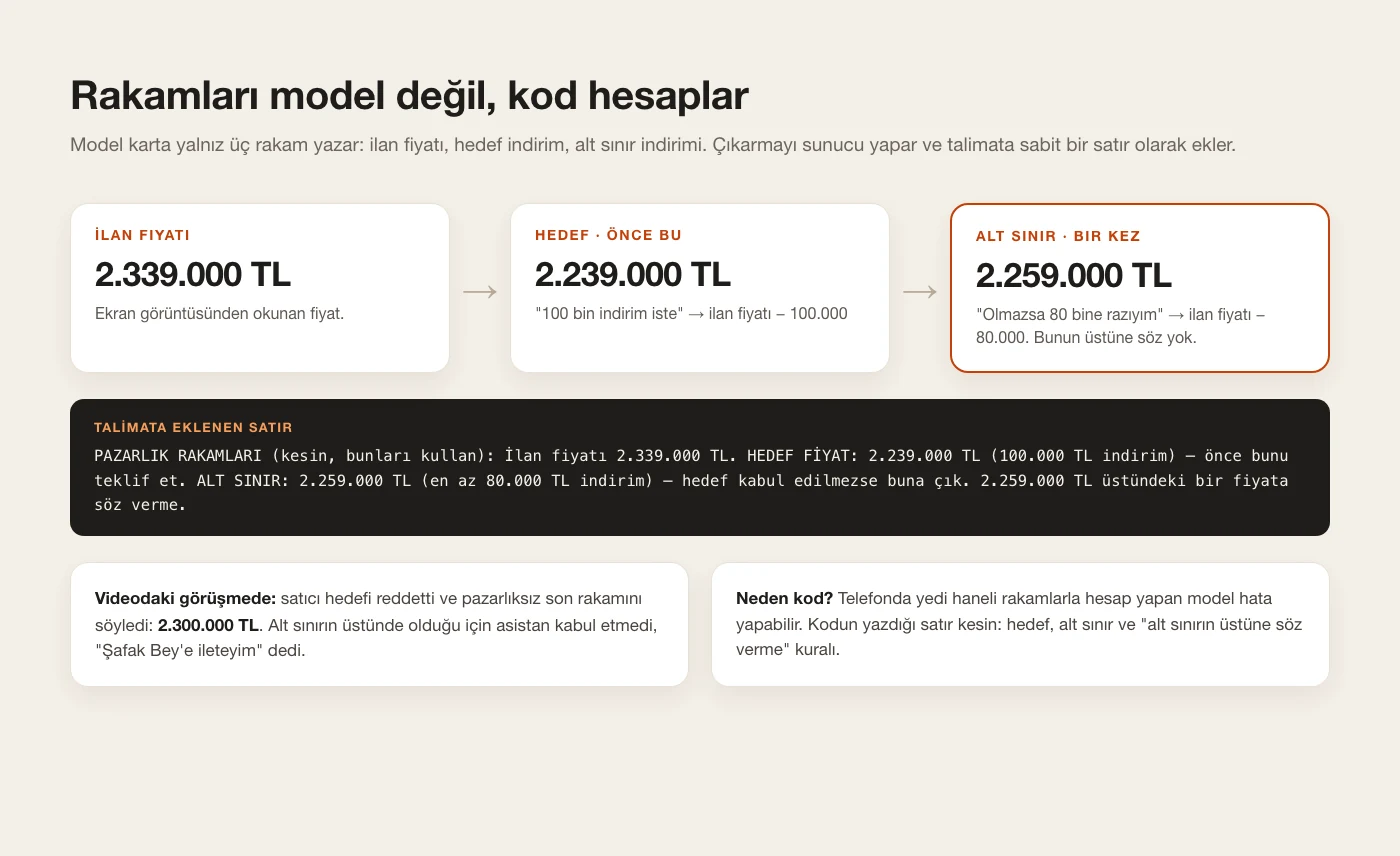
The model writes only three numbers on the call card: the listing price, the target discount and the minimum discount. I don't leave the subtraction to the model. The server computes the target price and the floor and appends them to the instructions as a fixed line: the listing price, the target price to offer first, the floor to fall back to if the target is refused, and the rule "never commit to a price above the floor". A model doing arithmetic with seven-digit numbers on a phone call can slip; a line written by code can't. If I give only one number, target and floor are the same.
5. Opening: a greeting, then honesty right away
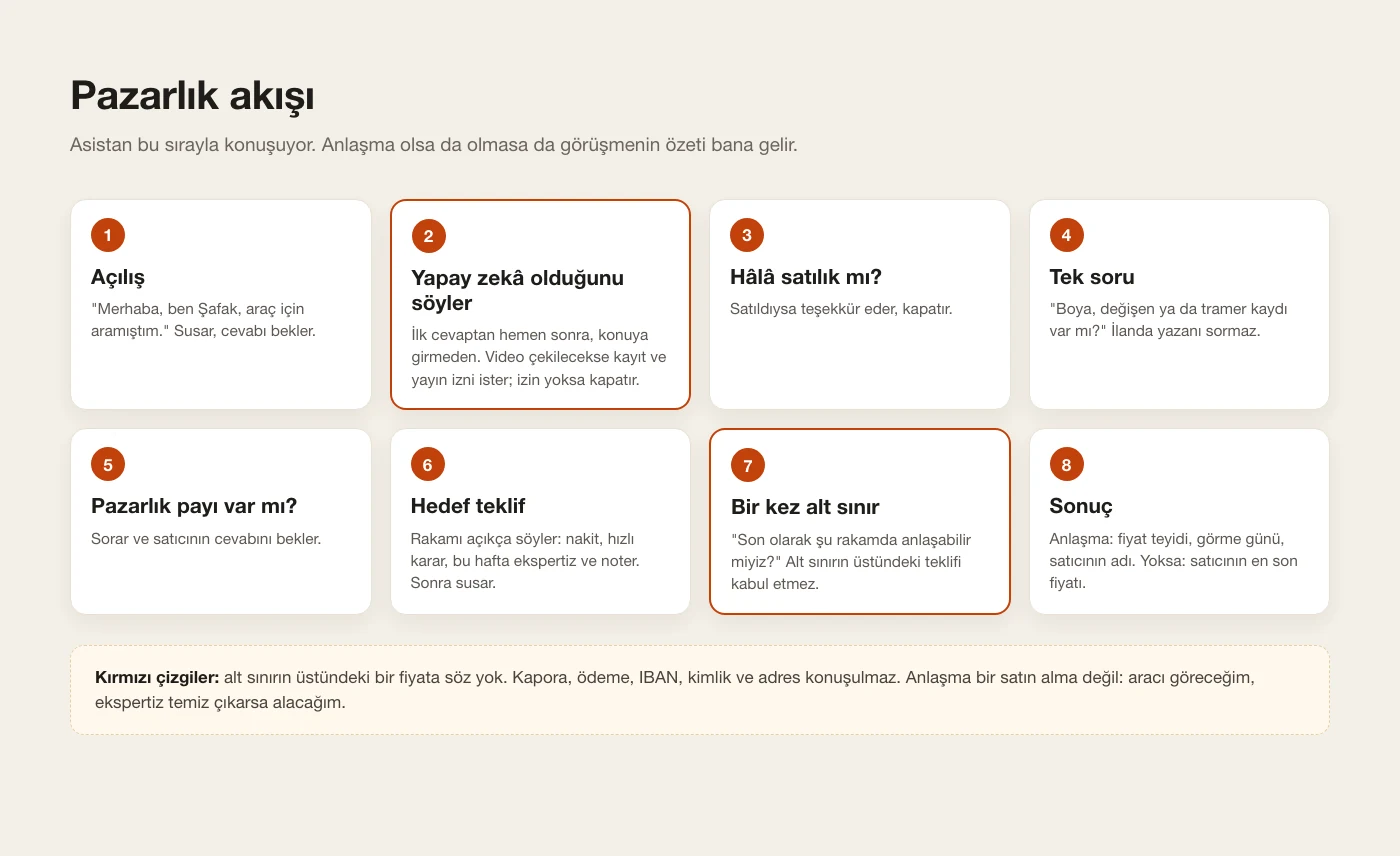
Every negotiation call opens with the same sentence: "Hi, this is Şafak, I'm calling about the car." The assistant says it, goes quiet and waits for the reply. As soon as the other person answers, before any topic, it says who it is: "By the way, I'm an AI assistant calling on behalf of Şafak." From then on it always refers to itself as "Şafak's AI assistant" and never claims to be human. If the seller asks whether it's an AI, it answers honestly; if they're uncomfortable, it apologises and hangs up. In my other scenarios the assistant introduces itself in the first sentence. In a negotiation the first sentence is a greeting and the introduction comes right after the other person's first reply; nothing about the car is discussed before it. The voice is male and firm.
6. Filming it? Ask for recording and publishing consent
If I'll use the call in a video, I tell the assistant "I'm filming this" and the card is marked for recording consent. The introduction then becomes: "This is an AI assistant calling on behalf of Şafak. With your permission this conversation will be recorded and published. Is that OK with you?" A clear yes: it moves on to the negotiation. A no: it says "I understand, sorry to bother you, have a nice day" and hangs up. If the answer is unclear it asks once more; without a clear yes it counts as a no. The answer shows up on my screen instantly and is logged. The seller in the video said "Sure, sure."
On normal calls I don't record audio, only a text transcript. Recording consent is asked only on calls I'll film. In Turkey, recording and publishing a conversation without the other person's consent can be a crime.
7. The negotiation flow: eight steps
The flow in the instructions goes in this order. First it asks whether the car is still for sale; if it's sold, it thanks them and hangs up. Then it asks at most one or two questions, ideally one: "Any paintwork, replaced panels or insurance-claim record?" It doesn't ask what's already in the listing, like mileage or service history. It asks "Is there room for negotiation?" and waits. Then it states the target price clearly and justifies it: cash payment, a quick decision, inspection and notary this week. If that's refused, it goes to the floor once: "As a last offer, could we agree on this number?" If the seller names a price above the floor, it doesn't accept and says "I'll pass that on to Şafak." If the seller quotes more than the listing price, it politely points that out. If they agree, it repeats the price to confirm and asks for a good day to view the car and the seller's name. If they don't, it asks for the seller's very last price. When the call ends, the summary comes to me.
8. Tone: a confident buyer
A polite but timid assistant is useless in a negotiation. The instructions say: calm, clear, short sentences; no hedges like "maybe" or "if it's convenient", no apology phrases, no filler honorifics. After stating a number it stops and waits. It says amounts slowly and clearly: "two million two hundred thirty-nine thousand lira". At most two rounds of haggling, never pushy. If the seller is rude or sarcastic, it doesn't bite back or join the joke; it confirms their last price and says goodbye politely.
9. Red lines
The assistant never commits to a price above the floor. It doesn't discuss deposits, payments, bank details, ID or address, and it never promises to send money. If trade-in or financing comes up, it says "I'll check with Şafak." Even a deal isn't a purchase: the condition is always the same, I'll see the car and buy only if the inspection is clean. When there's a deal, a separate tool records it and I get a notification.
10. Listen live
When the call starts, the chat assistant asks "Do you want to listen live?". If I say yes, the PBX opens a listen-only channel on the call and the audio streams to my browser. While I listen the chat assistant goes quiet so it doesn't talk over the call; when the call ends it comes back and tells me the result. That's how I listened to the call in the video.
11. Sequential negotiation: if one fails, call the next
If I send several listing screenshots together, a single card is created: the first listing is called right away and the others wait in the order of the images. If a call ends without a deal (no answer, no consent, or the seller didn't come down to the floor), the next listing is called automatically 20 seconds later. A deal stops the queue. Target and floor are the same for every listing; the price and the phone are read from each listing's own image. If I say "stop the queue", the remaining calls are cancelled.
12. Test it on yourself first
Before calling a real seller I run a demo call to my own number and play the seller myself. The assistant uses the real instructions, the same opening and the same seller name; only the number it dials is different. Play a difficult seller: say "let's meet in the middle", quote more than the listing price, be rude, say "I don't haggle with an AI", refuse recording consent.
13. The lesson from the call in the video
The seller refused the target offer and said "our final, non-negotiable number is 2.3 million". The assistant applied the rule correctly: it didn't accept a number above the floor and said "I'll pass that on to Şafak." But it never said the floor offer (2,259,000 TL). Saying the floor once, even to a seller who calls their number final, can be worth a few tens of thousands of lira. Test exactly this in your demo calls: when the seller says "final price", does the assistant still offer the floor? One more interesting detail: once the seller knew he was talking to an AI, he didn't drag the haggling out and went straight to his final number.
14. Add it to your own system
If your phone assistant is ready, give the prompt below to Claude Code or whichever coding assistant you use to add the negotiation scenario. Fill in the square brackets with your own details. It will show you every change for approval first, and run demo calls to your own number before any real call. If you don't have a phone assistant yet, build the base first with the prompt in the previous guide: that one sets up the PBX and the GPT-Live connection, this one adds the negotiation scenario.
Base system first: the phone assistant guide
Add a "Negotiation" scenario to my existing AI phone assistant. The assistant already places outbound calls with OpenAI GPT-Live over SIP through my own PBX, and my chat assistant creates call cards through a tool. Show me every change before you apply it, and test with demo calls to my own number before any real call.

1. Listing intake (chat assistant)
- When I send a screenshot of a listing (car, real estate, marketplace) and say "call the owner and negotiate", read from the image: title, make/model/year, mileage, listing price, city, seller name and phone.
- Send images to the vision model in HIGH detail (up to 2048 px). At low detail (512 px) small text like the price and the phone number is unreadable.
- Take the seller's phone ONLY from the listing image or from a number I type explicitly. Never from my contacts or my CRM.
- If the price is unreadable, create the card with price = 0 (the assistant confirms the price on the call). If the phone is unreadable, ask me.
- Tool parameters: scenario="Negotiation", listing_price, target_discount, min_discount ("ask for 100k off, I'll settle for 80k" -> 100000 / 80000; if I give one number, both are equal), max_minutes=5, record_consent (true when I say I'm filming the call).

2. Numbers in code, not in the model
- Compute TARGET = listing_price - target_discount and FLOOR = listing_price - min_discount on the server and append a fixed line to the instructions: "NEGOTIATION NUMBERS (exact, use these): listing price X. TARGET PRICE: Y, offer this first. FLOOR: Z, go there only if the target is refused. Never commit to a price above Z."
- If the price is unknown, tell the assistant to ask the seller for the listing price, repeat it back to confirm, and subtract from that number.

3. Opening and honesty
- First sentence: "Hi, this is [MY NAME], I'm calling about your car." Then stop and wait for the reply.
- Right after the first reply, before any topic: "By the way, I'm an AI assistant calling on behalf of [MY NAME]." From then on it refers to itself as [MY NAME]'s AI assistant and never claims to be human. If asked whether it's an AI, it answers honestly; if the seller is uncomfortable, it apologises and hangs up.
- If record_consent is set, the disclosure becomes: "This is an AI assistant calling on behalf of [MY NAME]. With your permission this conversation will be recorded and published. Is that OK with you?" Clear yes: log the consent through a tool and continue. No: "I understand, sorry to bother you, have a nice day", log it, hang up. Unclear: ask once more, then treat it as a no. Show the answer on my screen live.

4. Negotiation flow (put this in the scenario instructions)
1) Ask whether the item is still for sale; if it's sold, thank them and hang up.
2) Ask at most one or two short questions; for a car ideally one: "Any paintwork, replaced panels or insurance-claim record?" Don't ask what the listing already says.
3) Ask "Is there room for negotiation?" and wait.
4) Offer the TARGET price clearly and justify it: cash payment, quick decision, inspection and notary this week. Never run the item down.
5) If refused, go to the FLOOR once: "As a last offer, could we agree on Z?" Do this even if the seller calls their number final. If the seller names a price above the floor, don't accept it: "I'll pass that on to [MY NAME]." Accept anything at or below the floor. If the seller quotes a price above the listing price, point it out politely.
6) If you agree, repeat the price to confirm and call a record_deal tool. The condition is always the same: [MY NAME] sees the car and buys only if the inspection is clean. Ask which day and time suits for a viewing, and the seller's name.
7) If you don't agree, ask for the seller's very last price, thank them, and say [MY NAME] will call back if it works.
8) Don't send me notes during the call; the summary goes to me when it ends.

5. Tone and red lines
- A confident buyer: calm, short, clear sentences. No hedging ("maybe", "if it's convenient"), no apologies, no filler honorifics. After stating a number, stop and wait. Say amounts slowly, in words. At most two rounds, never pushy. If the seller is rude or sarcastic, stay calm, confirm their last price and say goodbye.
- Never promise a price above the floor. Never discuss deposits, payments, bank details, ID or address, and never promise to send money. Trade-in or financing: "I'll check with [MY NAME]."
- If my assistant has a general rule like "never offer discounts yourself", make clear it applies to calls where I'm the seller. In this scenario the assistant is the buyer and asking for a discount is its job.

6. Sequential negotiation
- If I send several listings at once, create ONE call card: the first listing is called now, the others wait in a queue in image order, each with its own phone, name, summary and price. The same target and minimum discount apply to all.
- If a call ends without a deal (no answer, no consent, didn't reach the floor), call the next listing automatically 20 seconds later. Stop the queue when a deal is recorded, and give me a "stop the queue" command.

7. Live listening and demo
- When the call starts, the chat assistant asks "Do you want to listen live?". If yes, open a listen-only channel on the PBX and stream it to my browser; mute the chat assistant while I listen, then let it report the result.
- Demo mode: when I say "demo", call MY number but keep the real instructions, seller name and opening, so I can play the seller.

Demo test cases: the seller refuses the target and says "that's my final price" (does it still offer the floor once?), the seller says "let's meet in the middle" above the floor, the seller quotes above the listing price, the seller refuses recording consent, the seller asks "am I talking to a robot?", the seller is rude.

My language is [LANGUAGE], my name is [MY NAME], my currency is [CURRENCY].
Tips
- Don't crop the screenshot: the listing title, the price and the phone should be in the same frame.
- Set a realistic target. Mine was about 4% of the listing price; the seller came down 1.7%.
- Don't send it to haggle over a listing you have no intention of buying. The other side is a real person and their time matters.
- Mind the calling hours: my system doesn't call outside set hours unless I explicitly confirm it.
- Before putting it in a video, blur the seller's name, the plate, the listing number and the phone.
Frequently asked
Does the seller know they're talking to an AI?
Yes. The first sentence is a greeting; right after the other person's first reply, before any topic, it says it's an AI. If I'm filming, it also asks for recording and publishing consent. If the seller asks, it always answers honestly.
If there's a deal, has the assistant bought the car?
No. It confirms and records the agreed price; the condition is always the same: I'll see the car and buy only if the inspection is clean. It never discusses deposits, payments or bank details.
Why doesn't the model compute the target and the floor?
A model doing arithmetic with seven-digit numbers on a call can slip. When code computes them and writes them into the instructions as a fixed line, the numbers are exact and it can't commit above the floor.
What if the seller refuses recording consent?
The assistant apologises and hangs up. In a sequential negotiation, the next listing is called 20 seconds later.
Does it only work with one listing site?
No. As long as the price and the phone are readable in the screenshot, the same flow works for other car, marketplace or real-estate listings.
What does a negotiation call cost?
With the numbers I measured in the previous guide, an assistant minute is about 5 cents. This 3.5-minute call comes to roughly $0.18 plus the operator's per-minute rate.
Is this legal?
I call on my own behalf for a personal purchase, and the other person learns they're talking to an AI right after their first reply. If I'll publish the call, I get explicit consent. In Turkey, recording and publishing a conversation without consent can be a crime. Talk to a lawyer before any bulk or commercial use; this guide isn't legal advice.