How do you get AI to make real phone calls?
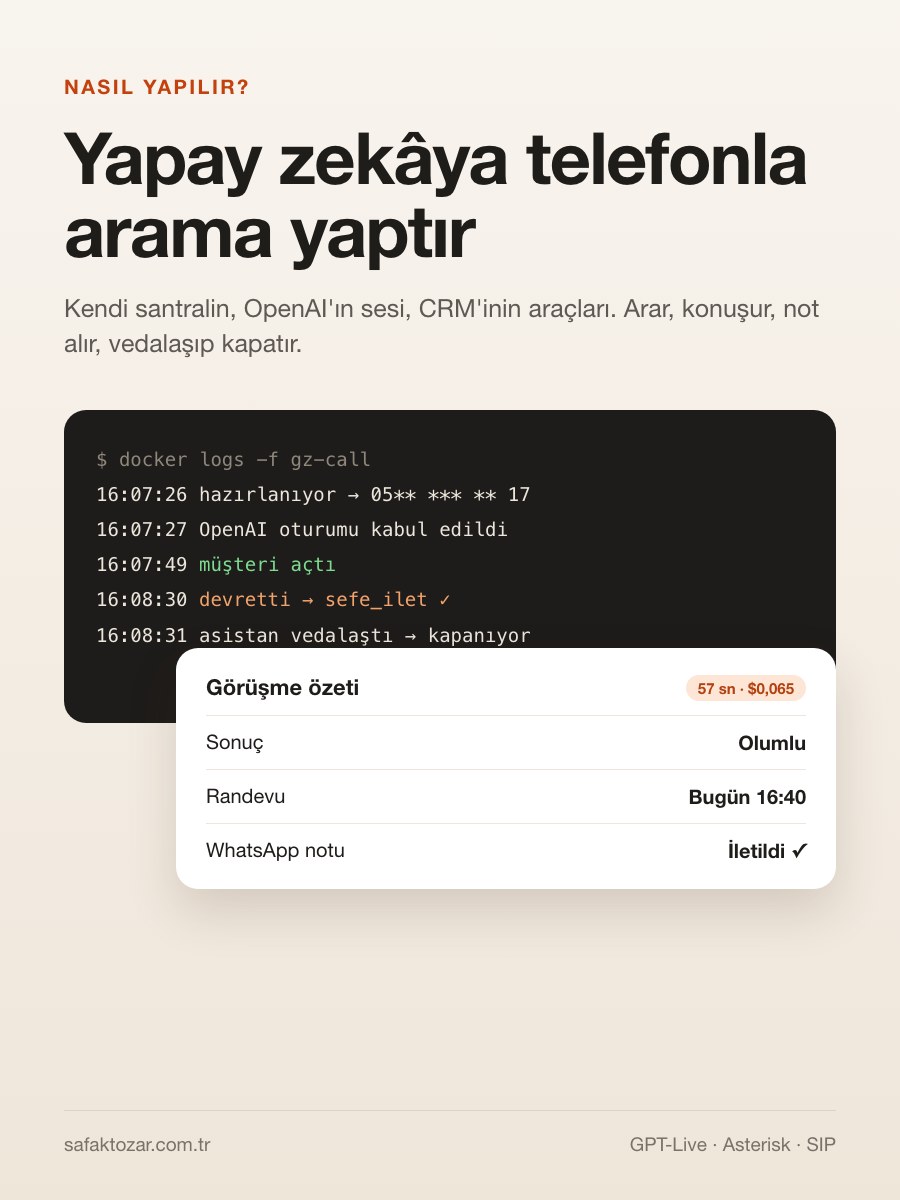
This system runs in my CRM and my personal assistant today. It reminds people about overdue payments, does a first call with new leads, and books my barber. Every call starts from a scenario: the task, the maximum length and the opening sentence. While it runs I watch the live transcript, can listen from the browser, and can take over. When it ends I get a summary, the extracted details and a WhatsApp report. I didn't use the hosted platforms (Vapi, Retell). The reason is simple: the voice is already processed by OpenAI, the platform in between only builds the bridge and takes a per-minute cut for it, and your business rules, tools and data live on their side. I built the bridge myself: an Asterisk PBX on my server, a small Node service that drives it, and my CRM running the tools. This is an advanced guide; you should at least have heard of SIP, RTP, Docker and iptables. I spell out the parts that cost me the most thinking over two days. At the end there's a ready-made prompt to have Claude Code build the same system from scratch.
What you'll need
- A Linux server with Docker (the PBX is comfortable with 512 MB of RAM)
- An operator that gives you a SIP account plus outbound minutes. I used a Turkish 0850 business line
- An OpenAI project with GPT-Live access and a webhook signing secret
- Asterisk 20 and Node.js 22 (for the call manager)
- A backend to run the tools (mine is a PHP CRM) and a notification channel (a WhatsApp API)
- The basics of SIP, RTP, NAT and iptables
Step by step
1. Get the architecture straight: four pieces
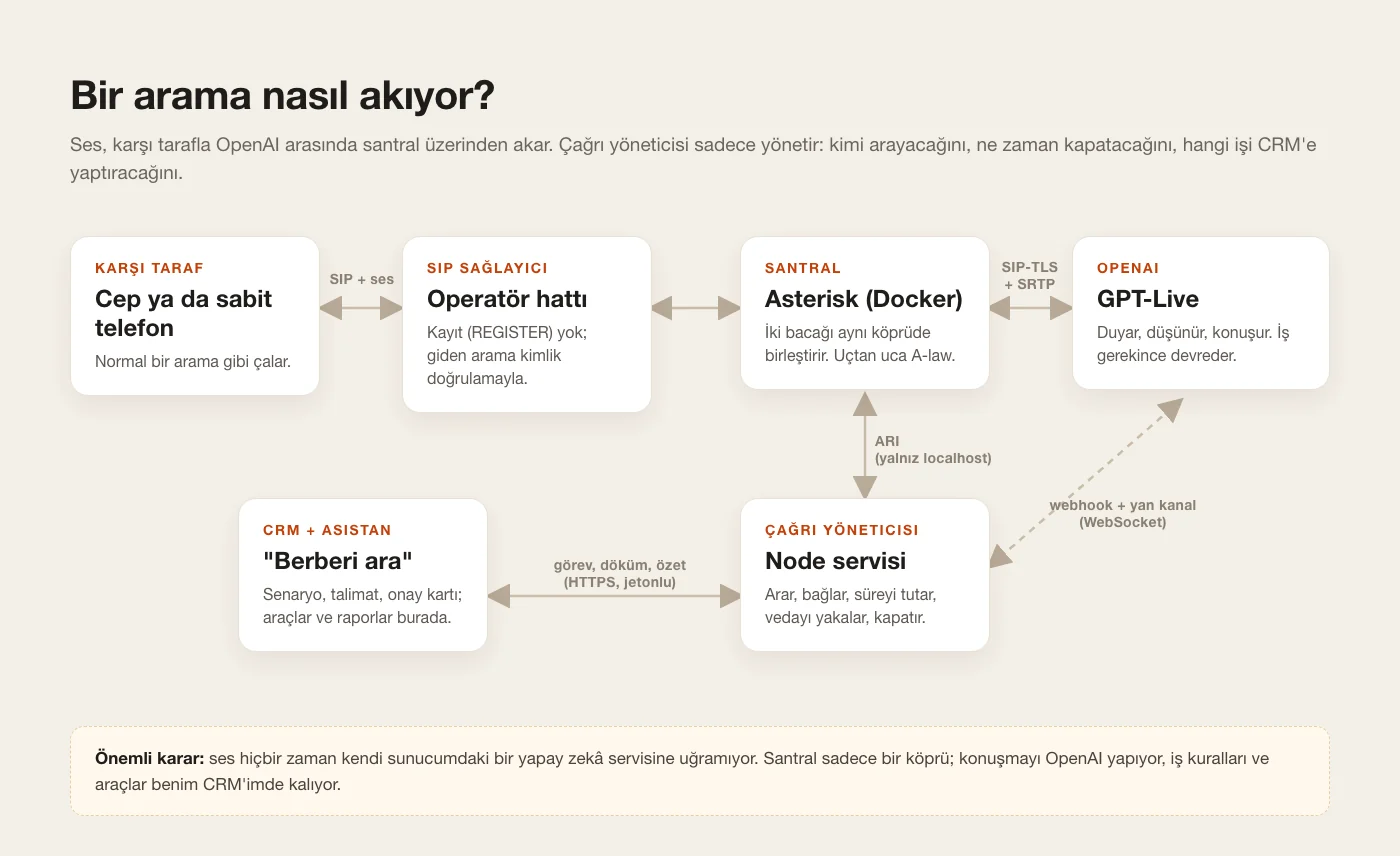
The other person's phone, the operator's SIP trunk, my PBX, and OpenAI. OpenAI's GPT-Live model speaks SIP natively: there's a SIP address, and calling it opens a voice session. So I don't need a WebRTC server or LiveKit. All I need is a PBX that joins two SIP legs in one bridge: one leg to the operator, one to OpenAI. I chose Asterisk because it's mature and ARI (REST + WebSocket) lets me control every channel from code. The brain driving Asterisk is a separate Node service I call the "call manager". It decides whom to call and when, when to hang up and which work to hand to the CRM. The conversation itself never goes through an AI on my server. Audio just flows through the PBX; I only orchestrate.
2. Run Asterisk in Docker with every door shut
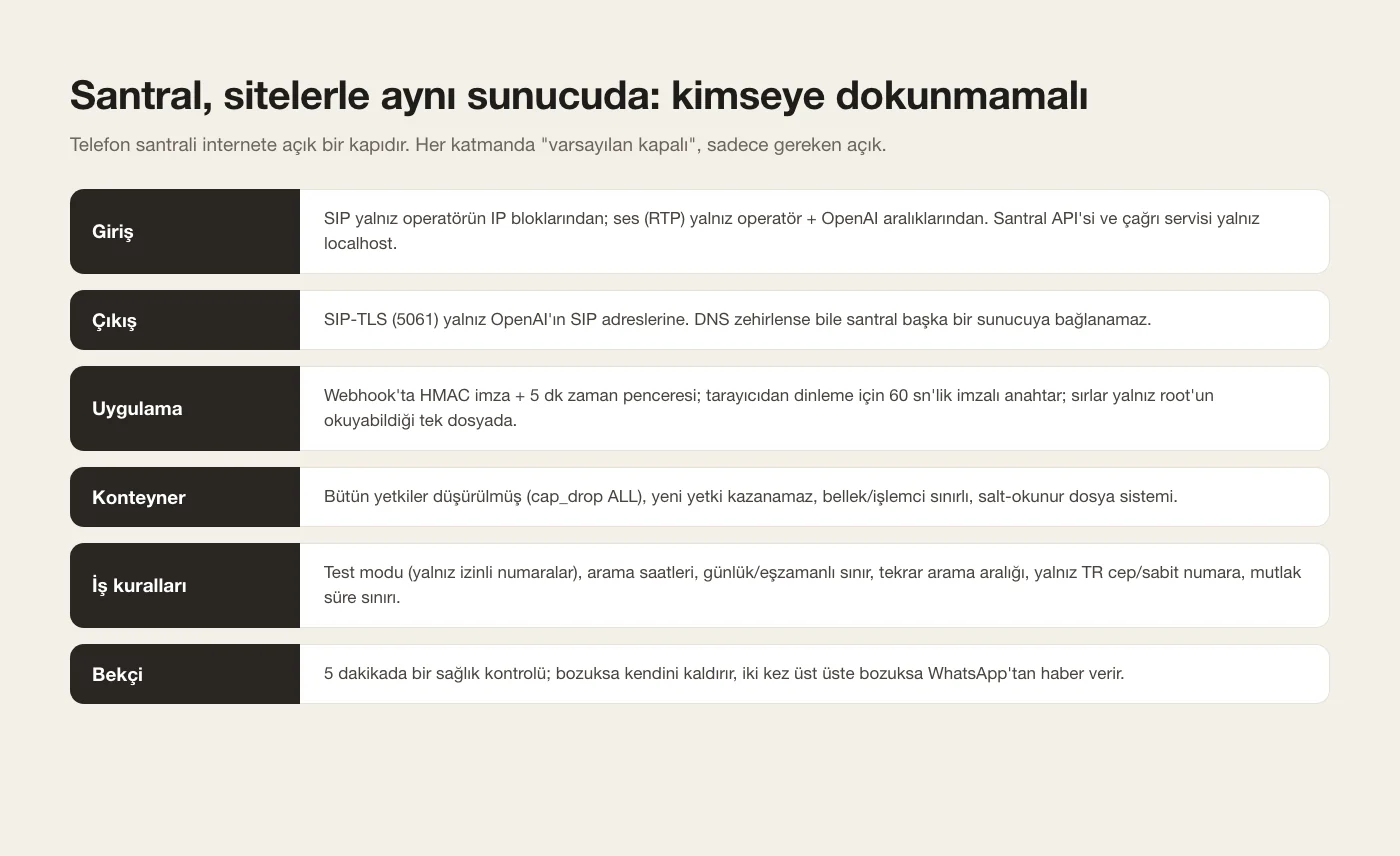
I run Asterisk on the host network: opening a 200-port RTP range (10000-10199) is far cleaner than fighting Docker's port mapping. The container drops every Linux capability (cap_drop ALL) and runs with no-new-privileges. Asterisk drops root for its own user at startup, and memory and CPU are capped. Config files are mounted read-only. In modules.conf everything that opens a port to the outside (legacy chan_sip, AMI, public HTTP) is off, and ARI listens on 127.0.0.1 only. All secrets (operator password, OpenAI key, webhook secret, ARI password, service token) live in ONE root-only file. A small setup script renders Asterisk's secret configs from it and restarts the containers, so no key ever sits inside code or config.
3. Connect to the operator without registering
I talk to the operator over PJSIP but I do NOT send REGISTER. If I registered, calls to my number would land on the PBX, and the line's "forward to my mobile when unreachable" setting had to stay exactly as it was. Outbound calls answer the INVITE's digest challenge with outbound_auth. Inbound traffic is only accepted from the operator's IP blocks (identify). Codecs are A-law and µ-law. The dialplan only dials national mobile and landline numbers; 00, premium-rate and short numbers are rejected. A small but annoying trap: I wanted to carry the maximum duration inside the extension (number-150), but Asterisk ignores "-" in patterns, so I used a letter as the separator (05XXXXXXXXXm150). The call is placed with Dial(...,S(seconds)), and on answer TIMEOUT(absolute) is set on the channel, so even if the call manager crashes the call can't stay open forever.
On day one every call returned "486 User Busy" and I spent hours thinking the phone was busy. The "Server" header in the SIP trace showed the busy answer came from the operator's own server. The real cause: the line had no balance or minutes. Buying a package fixed it.
4. Connect to OpenAI over SIP-TLS: the wildcard certificate trap
The OpenAI side is sip:proj_<project-id>@sip.api.openai.com on port 5061, TLS transport, SDES-SRTP media encryption. The first TLS handshake failed. OpenAI's certificate is a wildcard (*.api.openai.com), and pjproject rejects wildcard certificates for SIP per RFC 5922. I tried a different server name; OpenAI only accepts TLS with SNI "sip.api.openai.com" and returns "internal error" otherwise. The way out has two parts: I turned off server certificate verification in the PBX (verify_server=no) and in exchange added an EGRESS firewall rule so port 5061 can only reach OpenAI's SIP addresses. The addresses are refreshed from DNS by cron every day. Even if DNS were poisoned, the PBX couldn't connect anywhere else, and the link is still encrypted. One more note: OpenAI's EU entry point (sip-eu) only works for projects created with EU data residency; a normal project gets 401.
5. Accept the session via webhook and open the sideband
When the PBX calls OpenAI, OpenAI sends you a webhook: live.transport.incoming. First job: verify the signature. It's Standard Webhooks: HMAC-SHA256 over "id.timestamp.body", with the base64 value after the whsec_ prefix as the key. I reject timestamps older than 5 minutes. Second job: find out WHICH call this session belongs to. When I originate the call I add a custom SIP header to the INVITE carrying a random per-call token, and the webhook echoes that header back. If it matches, I accept the session with POST /v1/live/sessions/{id}/accept: the scenario's instructions, the voice (I use marin) and delegation {type: "client"}. Then I open the sideband with wss://…/live/sessions/{id}/attach. Transcripts, delegation events and session close come in through it, and instructions and results go out through it. No match or a bad signature means the session is rejected.
6. Get the assistant ready first, then dial the person
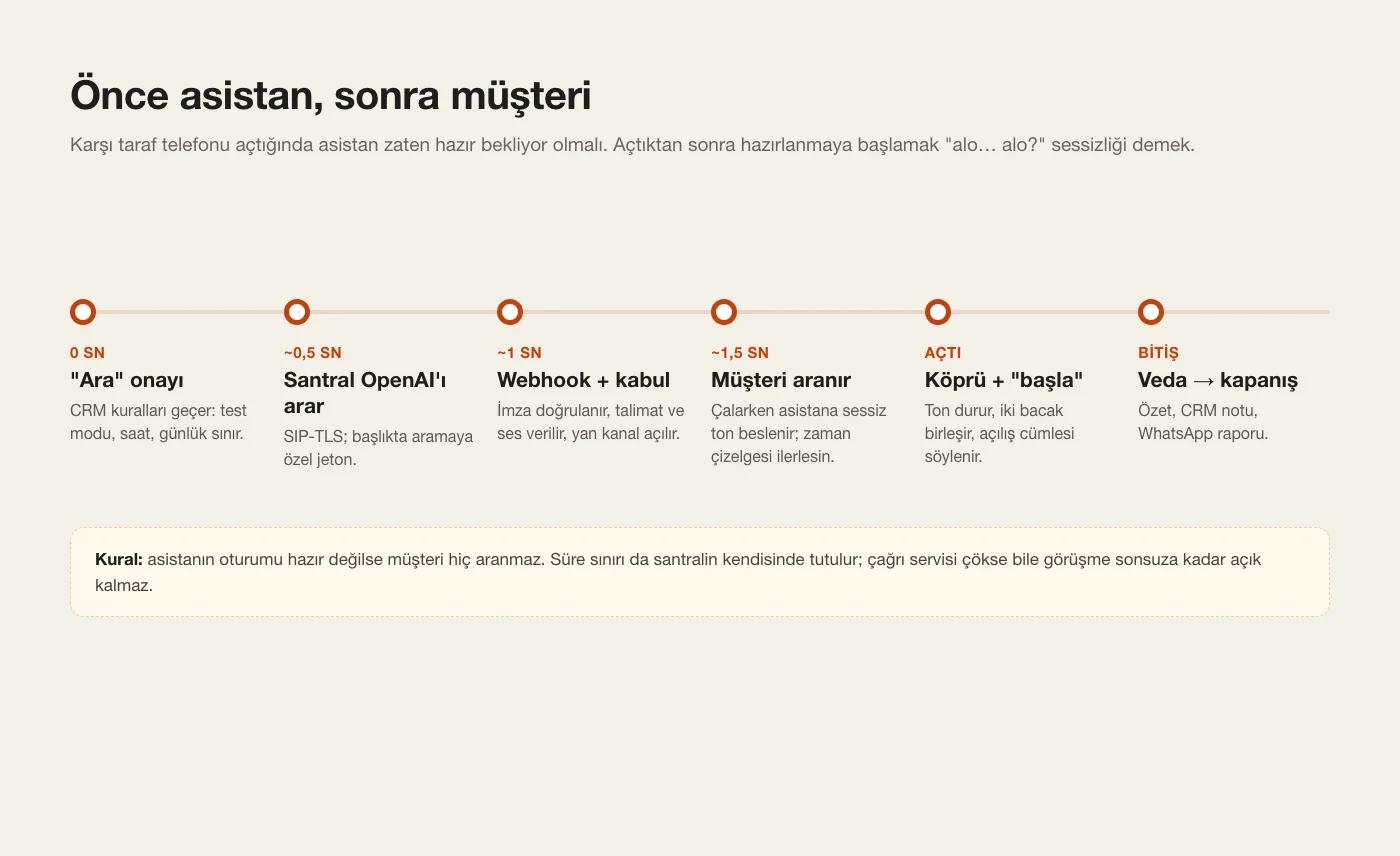
Order matters a lot. First the OpenAI leg comes up, the session is accepted and the sideband connects. The person is never dialled before the assistant is ready. Then the person is dialled by sending a Local channel into the dialplan. When they answer, both legs join the same "mixing" bridge and an instruction goes out over the sideband: "The person answered. Your first sentence is exactly: …". The instructions also start with "don't speak until you're told the person answered", otherwise the model talks into the void while the phone rings. With this order the assistant starts speaking 2-3 seconds after the phone is picked up.
7. The hardest bug: the assistant talks but can't hear
On the first real call the assistant greeted nicely, then ignored whatever the other person said, and the session dropped after 19 seconds. To diagnose it I watched the RX/TX counters of both legs with pjsip show channelstats every two seconds. Audio was arriving from the operator (RX rising), but TX towards OpenAI froze the moment the person answered. The cause was transmit_silence=yes in asterisk.conf: while Dial waits, it attaches a "silence generator" to the calling Local channel, and the person's audio got dropped as it was written to that channel. transmit_silence=no fixed it, and exposed a second problem: GPT-Live's timeline only advances with INCOMING audio frames. With no frames during ringing, instructions weren't processed ("context_injection_incomplete") and the session closed after about 30 seconds. The fix is to play a silent tone (tone:0/1000) into the OpenAI leg while the phone rings. I also turned strictrtp off: the operator sends early media and the real media from different media servers, and the firewall does the source filtering.
With audio problems, don't guess, measure. channelstats shows which direction stops on which leg. For tests without a phone I added a test call that bridges the assistant to Asterisk's Milliwatt tone instead of a person.
8. Cut latency: A-law end to end
The operator speaks A-law and OpenAI accepts G.711, so opening both legs in ARI with formats=alaw leaves no transcoding in the PBX. You gain latency and CPU. The greeting instruction goes out the moment the person answers, with no wait. When a delegation event arrives I wait only 500 ms, because the event can arrive BEFORE the transcript of the person's last words. Most of the remaining latency is geography: OpenAI's media servers are in the US, about 150 ms round trip from Europe. The way to shorten that is an EU data-residency project and the sip-eu entry point.
9. The assistant's hands: delegation
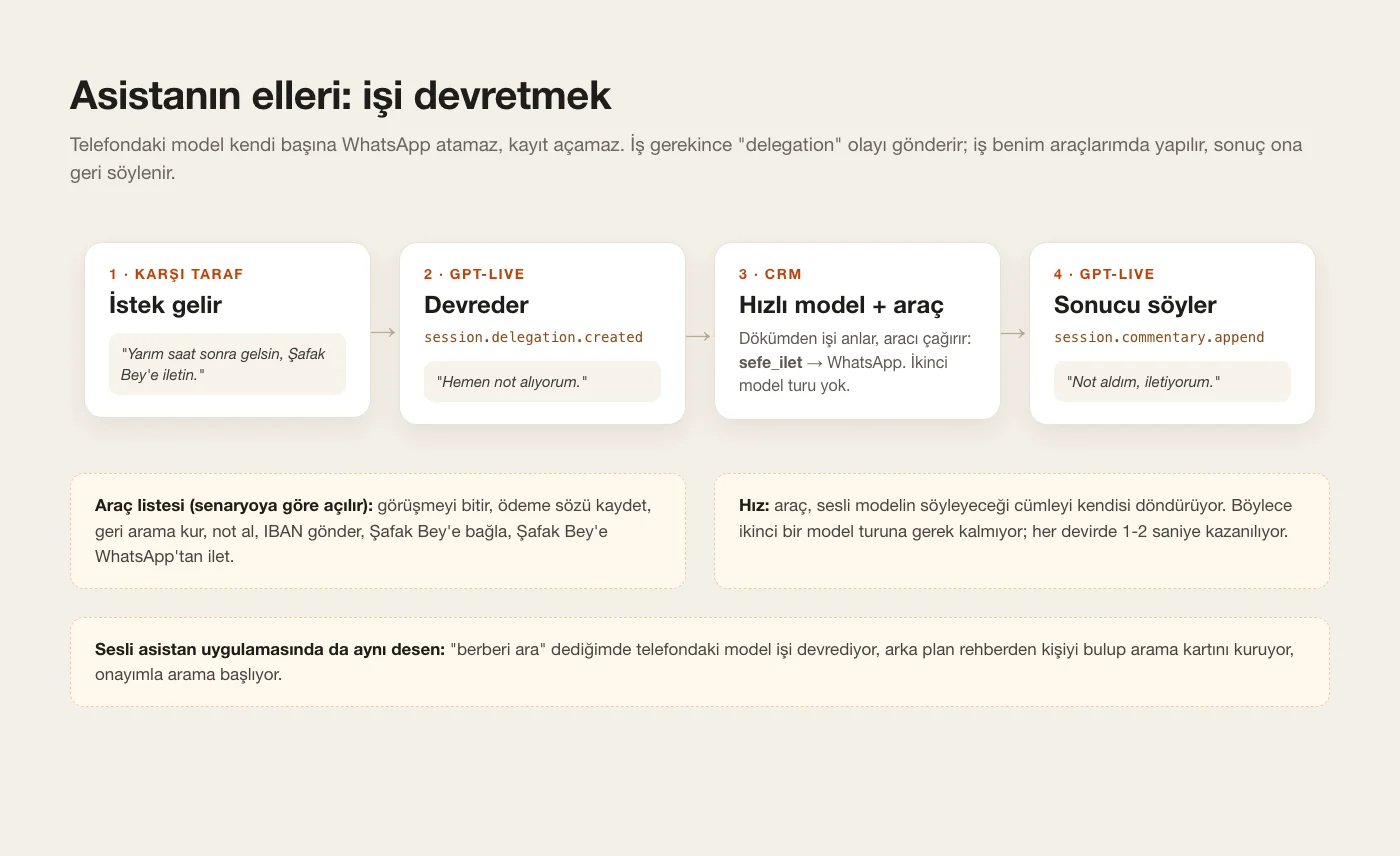
The model on the phone can't send a WhatsApp or create a record on its own. With "client delegation" the work comes to me. At the end of the instructions there's a plain-text "Delegation policy": which backend tools exist, when to delegate and when not to. When the model decides work is needed, session.delegation.created arrives on the sideband. The call manager sends the transcript so far to the CRM's task endpoint. There, a fast model (reasoning off) looks at the END of the transcript with the tools the scenario allows and calls one. The tools: end the call, record a payment promise, schedule a callback, take a note, send the IBAN to the person's WhatsApp, transfer to me, and send me a note on WhatsApp. One important speed trick: the tool returns the sentence the voice model should say ("Noted. Say 'I've made a note'"). That removes a second model round and saves 1-2 seconds per delegation. The sentence goes back with session.commentary.append, tied to the delegation_id. The "end call" tool says nothing at all; the line closes as soon as the assistant is quiet.
10. Write instructions that finish the job
My first attempts were polite but useless. It asked the barber "are you available", got a "yes", said thanks and hung up without ever asking which times were free. Now every scenario's instructions carry "job-finishing rules". Reach the goal of the task and don't settle for "yes"; ask for the concrete information (which day, which hours). Confirm by repeating it back. If no preference was given, don't decide, collect the options. "No questions" is not a reason to end; steer towards a next step. I also put the current date and time in the instructions, so when the person says "come in half an hour" the assistant converts it ("so around 16:40, right?") and passes it to me as a clock time. 20 seconds before the limit a warning goes out: "if you're waiting for an answer, get it first, confirm, then say goodbye". Forms of address are their own rule. With a single first name the model may say "Hello Ahmet", which is rude in Turkish, so the template falls back to "sir/madam" and the model gets a "Bey/Hanım" rule. The identity is selectable: "on behalf of Gurizon" or "I'm Şafak Tozar's AI assistant". It never claims to be human, and if asked it says clearly that it's an AI.
11. When should it hang up?
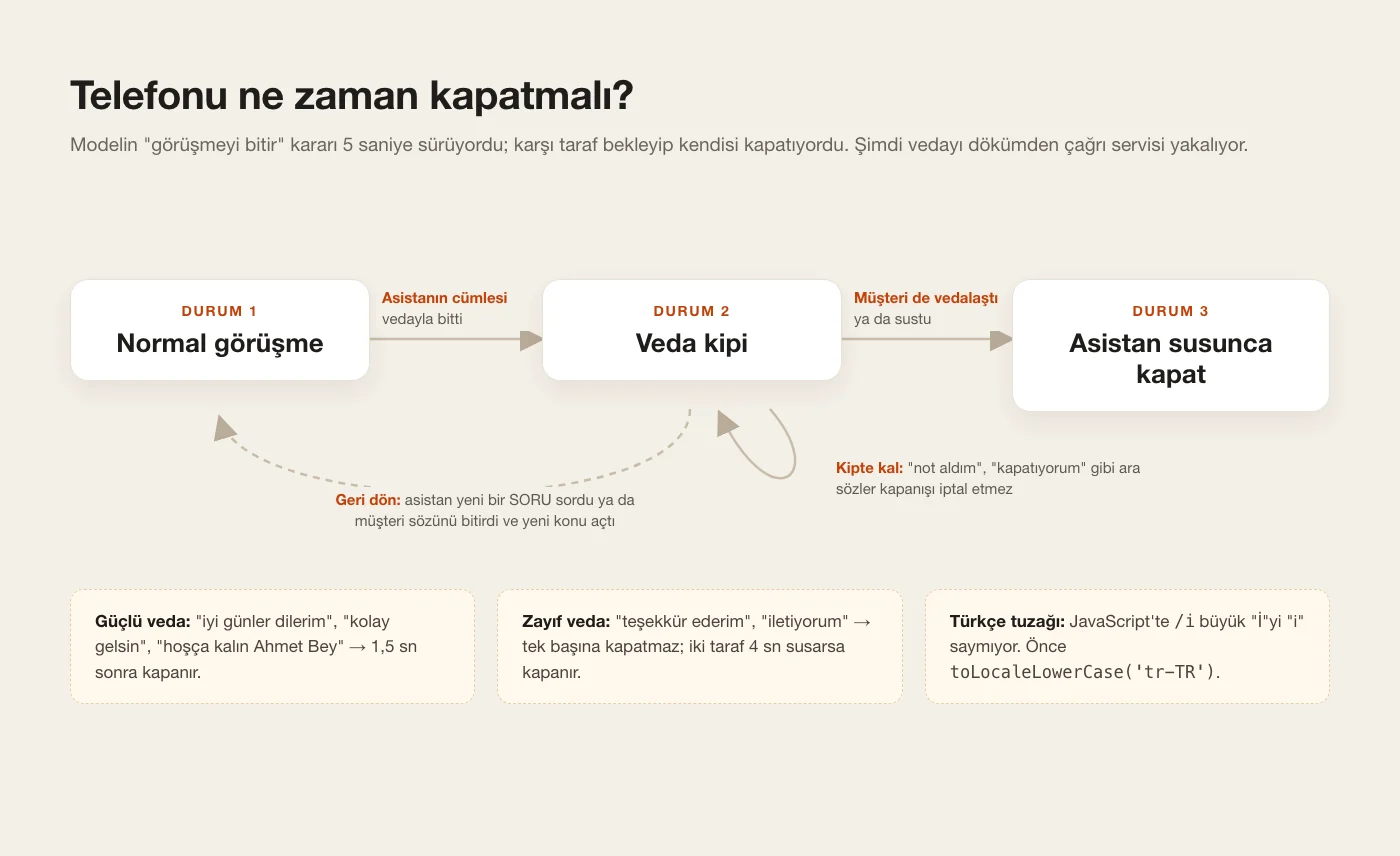
This is the most underrated part of voice AI. The model's "end call" tool took about 5 seconds, and the other person would wait and hang up themselves. Now the call manager detects the goodbye in the transcript itself. If the assistant's sentence ENDS with a strong goodbye ("have a nice day", "take care, Ahmet Bey"), the call enters "goodbye mode" and closes 1.5 seconds later, once the assistant is quiet. A weak goodbye ("thank you", "I'll pass it on") doesn't close on its own; it closes after 4 seconds of silence on both sides. The latest trap I fixed: a note was still being processed in the background at goodbye time, and the assistant said fillers like "noting it… hanging up…". These cancelled the hang-up, and the goodbye dragged on for 20 seconds. Now fillers don't cancel goodbye mode. Only a new QUESTION from the assistant, or the other person finishing a sentence that opens a new topic, cancels it, and the line never closes while the person is saying something that isn't a goodbye. Turkish has its own trap: JavaScript's /i flag doesn't match capital "İ" with "i", so you need toLocaleLowerCase('tr-TR') first. On silence the assistant asks "Can you hear me?" once and hangs up if nobody answers. The PBX's absolute time limit sits outside all of this.
12. Warm transfer and live listening
If the person says "I'd like to speak to Şafak Bey", the assistant delegates. The person hears ringing while the PBX calls me. When I pick up, a whisper note plays: 24 kHz raw PCM generated with gpt-4o-mini-tts, stored as an Asterisk .sln24 file. It sounds like "Y from company X wants to talk to you about a payment, press one to connect". If I press 1 (DTMF) I join the bridge and the assistant leaves. If I don't answer or don't press, the person goes back to the assistant, which says it couldn't connect and that I'll call back. Live listening works two ways. Listening by phone, the PBX calls me and I join the bridge muted; "Take over" unmutes me and the assistant leaves. In the browser, "Listen" makes the PBX open a snoop (spy=both) on the person's leg. externalMedia streams µ-law RTP to a local UDP port, the call manager turns it into a WebSocket, and nginx exposes it. The browser decodes µ-law with a lookup table and plays it through WebAudio with a 150 ms buffer. The URL carries a 60-second HMAC-signed key, and the snoop closes when the last listener leaves.
13. Wire it into the assistant: "call the barber"
I added the same calling system as a tool in my personal assistant (text and voice). When I say "call the barber, book something for today", it finds "barber" in the contacts synced from my phone and asks which one if several match. For appointments, if the time preference is unknown the tool deliberately returns an error, so the model has to ask "For when?" first. Then a call card appears: whom, which task, the maximum length and the opening sentence. When I say "Call" the call starts, and when it ends the summary and a link to the transcript land in the chat. Voice mode has two safety locks. First: a card can't be approved in the same turn it was created. It has to be read to me, and the approval comes from my next sentence. The second one came later: the voice model once said "OK, starting the call" without ever delegating. No call went out, and when I asked "did you call?" it read me the result of an older call. Now, if a card is pending and a short "call", "yes" or "send" isn't followed by a delegation within 1.5 seconds, the page hands the work to the backend itself. If the model delegates late, the same job still doesn't run twice.
14. Security: the PBX must not touch anything else
This PBX runs on the same server as my websites. It has its own iptables chains and touches no other rule. Inbound, SIP is only accepted from the operator's IP blocks, and audio (RTP) only from the operator's and OpenAI's media ranges. The PBX API, the call service and the listening WebSocket are loopback-only. Outbound, port 5061 can only reach OpenAI's SIP addresses. Dropped packets are logged with a rate-limited prefix; that's the first place to look if audio goes one-way. In the application layer there's the webhook signature with a time window, a token between services, and constant-time comparison. The business rules include a test mode (only allowed numbers can be called), calling hours, daily and concurrent caps, and a minimum interval before calling the same number again. A watchdog script checks health every 5 minutes, brings the containers back up if something's broken, and messages me on WhatsApp after two failures in a row.
15. Have Claude Code build it with the ready-made prompt
I built this whole system with Claude Code over SSH to the server. The prompt below contains the architecture from this guide and the fix for every trap. Paste it into Claude Code and fill in the square brackets at the end with your operator, caller ID and backend. It asks Claude to show you every config before applying it and to call only your own number while test mode is on. Your first goal is the assistant "hearing" you in the Milliwatt test call. Then a real call to your own mobile. Only after that should you call a real person.
Build me an outbound AI phone-calling system on my Linux server. The voice is OpenAI GPT-Live over SIP; my own Asterisk bridges it to my SIP operator. Work step by step, show me every config before you apply it, and never call a real number until I say so: add a test mode that only allows my own number.

Architecture
- Asterisk 20 in Docker: host network, cap_drop ALL, no-new-privileges, config mounted read-only. Load only the modules you need; ARI/HTTP on 127.0.0.1 only; RTP range 10000-10199.
- A Node 22 "call manager" (only dependency: ws) on 127.0.0.1, protected by a token. It drives Asterisk through ARI and OpenAI through the webhook + sideband WebSocket.
- My backend exposes three token-protected endpoints: event (live transcript), task (tool loop), end (summary + report).
- All secrets live in one root-only env file; a setup script renders the Asterisk secret configs from it.

Operator (PJSIP)
- Outbound auth only, NO REGISTER (inbound routing must not change). Identify the operator by its IP blocks. Codecs: alaw, ulaw.
- The dialplan only allows national mobile/landline patterns. Pass the max duration inside the extension with a letter separator (Asterisk ignores "-" in patterns). Dial with S(max) and set TIMEOUT(absolute) on answer, so calls end even if the manager crashes.

OpenAI (PJSIP)
- sip:<project_id>@sip.api.openai.com:5061;transport=tls with media_encryption=sdes.
- pjproject rejects OpenAI's wildcard certificate and OpenAI only accepts SNI sip.api.openai.com, so set verify_server=no AND add an iptables OUTPUT rule that allows port 5061 only to the resolved OpenAI SIP IPs (refresh daily from cron).
- Add a random per-call SIP header on originate. On the webhook "live.transport.incoming": verify the Standard Webhooks signature (HMAC-SHA256 with the whsec_ key, 5-minute window), match the header to the call, POST /v1/live/sessions/{id}/accept with instructions, voice and delegation {"type":"client"}, then open wss://api.openai.com/v1/live/sessions/{id}/attach.

Call flow
1. Originate the AI leg first (formats=alaw). Dial the person only after the session is accepted and the sideband is open (formats=alaw, no transcoding).
2. While the phone rings, play tone:0/1000 into the AI leg: the GPT-Live timeline only advances with incoming audio frames.
3. asterisk.conf: transmit_silence=no (a silence generator on the Local channel makes the AI deaf). rtp.conf: strictrtp=no (early media and media can come from different operator servers; the firewall does the source filtering).
4. On answer: stop the tone, put both legs in one mixing bridge, send session.instructions.append: "The person answered. Your first sentence is exactly: ...".
5. Delegation: on session.delegation.created wait 500 ms, send the transcript to my task endpoint; it runs a fast model with scenario-dependent tools and returns the sentence to say, so no second model round. Send it with session.commentary.append (delegation_id). If the tool is hangup, say nothing and hang up once the assistant is quiet.
6. Goodbye detection in the manager, don't wait for the model. Lowercase with toLocaleLowerCase('tr-TR'). A strong goodbye at the end of an assistant sentence enters "goodbye mode": hang up 1.5 s later once the assistant is quiet. Filler sentences don't cancel it; only a new question from the assistant, or a finished non-goodbye sentence from the person, cancels it. Never hang up while the person is saying something that isn't a goodbye. Weak goodbyes ("thank you") close after 4 s of silence on both sides.
7. Put the current date and time in the instructions so relative times ("in half an hour") become clock times. Warn 20 s before the limit: "if you're waiting for an answer, get it first, confirm it, then say goodbye". Silence: ask "can you hear me?" once, then hang up.
8. Optional warm transfer: ringing tone to the person, call me, play a TTS whisper note, bridge only if I press 1, otherwise hand the person back to the assistant.

Security and limits
- An iptables chain: SIP only from the operator's IP blocks, RTP only from the operator and OpenAI media ranges, ARI and the manager only from loopback. Don't touch any other rule on the server.
- Max 3 concurrent calls, a daily cap, calling hours, a repeat-call interval.
- A watchdog cron every 5 minutes that restarts unhealthy containers and messages me after two failures in a row.

Diagnostics
- Log every OpenAI event type once per call, with the call id on every line.
- Use `pjsip show channelstats` to see which direction the audio stops in.
- A test call that bridges the AI to Milliwatt instead of a real phone.

My operator is [OPERATOR], my caller ID is [NUMBER], my backend is written in [PHP / NODE / PYTHON].
Tips
- Keep test mode on for the first days and only call your own number. Play a difficult customer: interrupt, change the subject, go silent, say "fine" and hang up.
- Keep calls short: my scenarios are 2-2.5 minutes max. Enforce the limit both in the call manager and in the PBX.
- Don't record audio; a text transcript is enough. It's easier on data protection and the call history is searchable.
- Log every OpenAI event type once per call, tagged with the call id. When something breaks you immediately see which step never arrived.
- Test the goodbye logic locally by replaying real transcripts. Catching timer bugs on live calls is expensive.
- People seem less likely to pick up Turkish 0850 business numbers. If you can, call from a geographic or familiar number.
Frequently asked
Why not Vapi or Retell?
The voice is already processed by OpenAI; the platform in between builds the bridge and takes a per-minute cut for it. With my own PBX the per-minute cost is just OpenAI plus the operator. The real win is control: instructions, tools, data and hang-up logic are all mine. I also built a simple version of Vapi's dashboard into my CRM: scenarios, duration, voice, live transcript, listen, take over.
Do I need LiveKit or WebRTC?
Not for phone calls. GPT-Live speaks SIP natively, so a PBX joining two SIP legs is enough. I only use WebRTC for my in-browser voice assistant, and that connects straight to OpenAI too.
What does a call cost?
Real numbers I measured: a 52-second call cost $0.047, a 2-minute-31-second call $0.13. Roughly 5 cents per assistant minute, plus the operator's per-minute rate. Note: the OpenAI session is already open while the phone rings, because the assistant gets ready first, so ringing time is billed too.
Does it say it's an AI?
Yes, always. It introduces itself as an AI assistant in the first sentence and never claims to be human. That's a hard rule in the instructions.
Can it answer incoming calls too?
The same pieces can do it: register with the operator and bridge incoming calls to an OpenAI leg. I kept it off on purpose. My number forwards to my mobile when unreachable, and the PBX doesn't touch that flow.
How good is its Turkish?
The conversation flows well. What caused trouble wasn't the language but the rules: forms of address ("Ahmet Bey", never "Hello Ahmet"), reading amounts naturally, turning relative times into clock times, and Turkish upper/lower case. All solved with instructions and code.
Are there legal limits on commercial calls?
Yes. In Turkey, commercial calls and messages fall under consent and IYS (the national opt-in registry) rules. I use this system for my own clients, people I already work with and personal errands, never for mass calling. This guide isn't legal advice; talk to a lawyer before using it at scale.