How do you get a camera to measure who's happy while playing PlayStation?
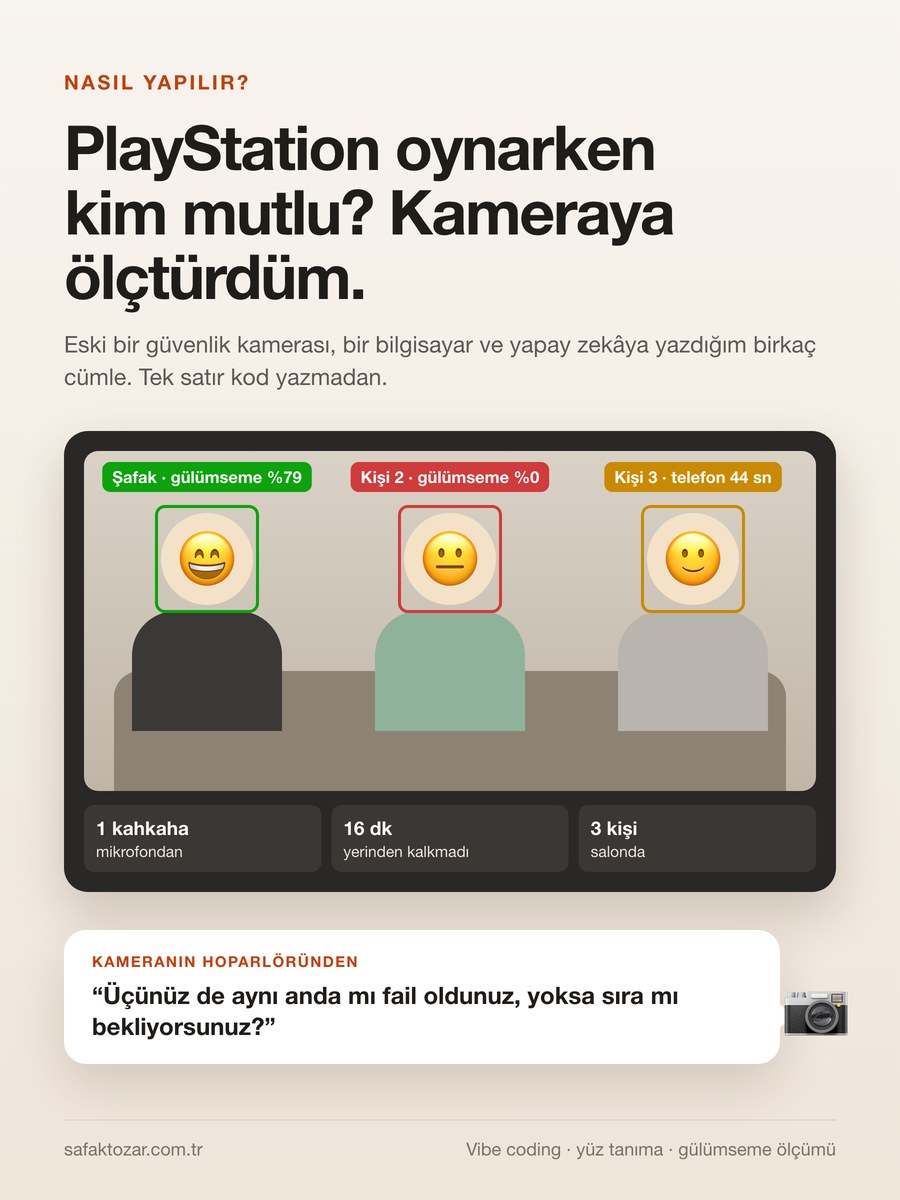
This guide continues my earlier one, where I put an AI assistant inside a camera. There I made the camera talk; here I make it look. The idea is simple: the camera only sends picture and sound, and all the thinking happens on a computer on the same Wi-Fi. The computer looks at every frame, finds the faces, recognizes who is who and measures how much each person is smiling. Let me say it up front: this measures smiling, not happiness. No camera can know what's going on inside someone. And there's one condition: everyone in the room must know what the camera is doing. At the end there's a ready-made prompt so you can have the same thing built for your own camera.
What you'll need
- A Wi-Fi camera with a microphone and a speaker (mine is an old Xiaomi; other brands work too, as long as it can serve its picture on the home network)
- A computer that stays on, on the same Wi-Fi (Mac or Windows)
- An AI tool that writes the code for you (I used Claude Code)
- An OpenAI API account: only for talking and heckling. The smile measurement works offline
- The knowledge and consent of everyone in the room
Step by step
1. Get the idea straight first
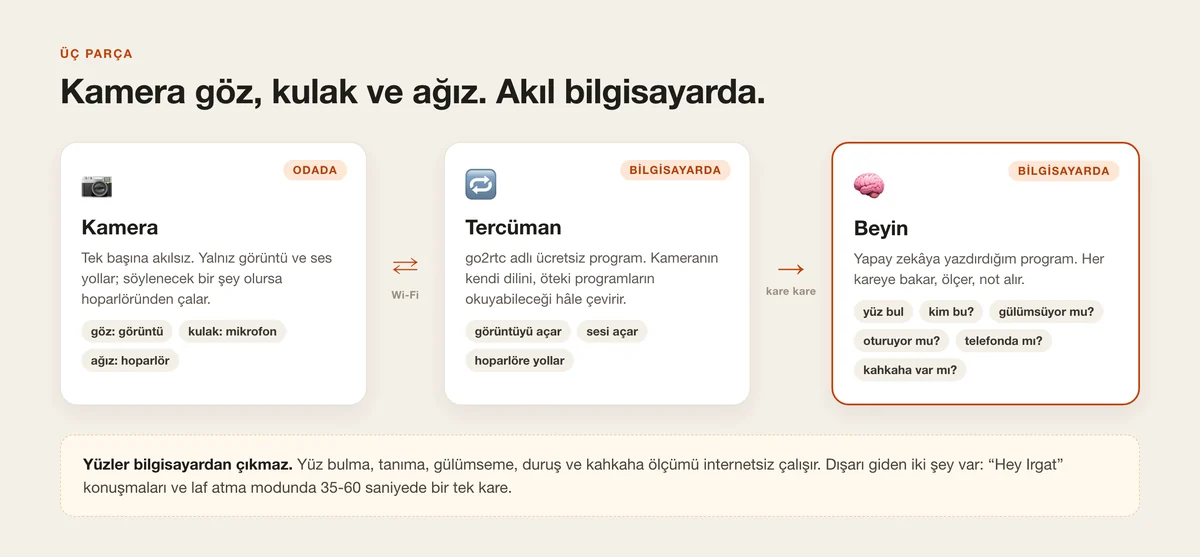
Think of the camera as a person, but a person with no mind. It has eyes (the picture), ears (the microphone) and a mouth (the speaker). It has no mind. We give it one: a computer on the same Wi-Fi takes what the camera sees, thinks about it and, when it has something to say, says it through the camera's speaker. So you install nothing inside the camera and you don't open it up. All the work happens on the computer.
2. Connect the camera to the computer
Normally a camera only talks to its own phone app. I put a free program called go2rtc in between. Think of it as an interpreter: it runs on the computer, takes the camera's picture and sound and turns them into something other programs can read. Sound going to the speaker passes through it too. The one condition is that the camera and the computer are on the same Wi-Fi. Mine is an old Xiaomi camera. Other brands work too, as long as the camera can serve its picture on the home network. I covered this step in detail, traps included, in the previous guide.
If your camera can't be made to speak through its speaker, the smile measurement still works. In that case you can have the lines spoken through the computer's speaker.
Previous guide: putting an AI assistant inside an old security camera
3. Don't write code, write what you want
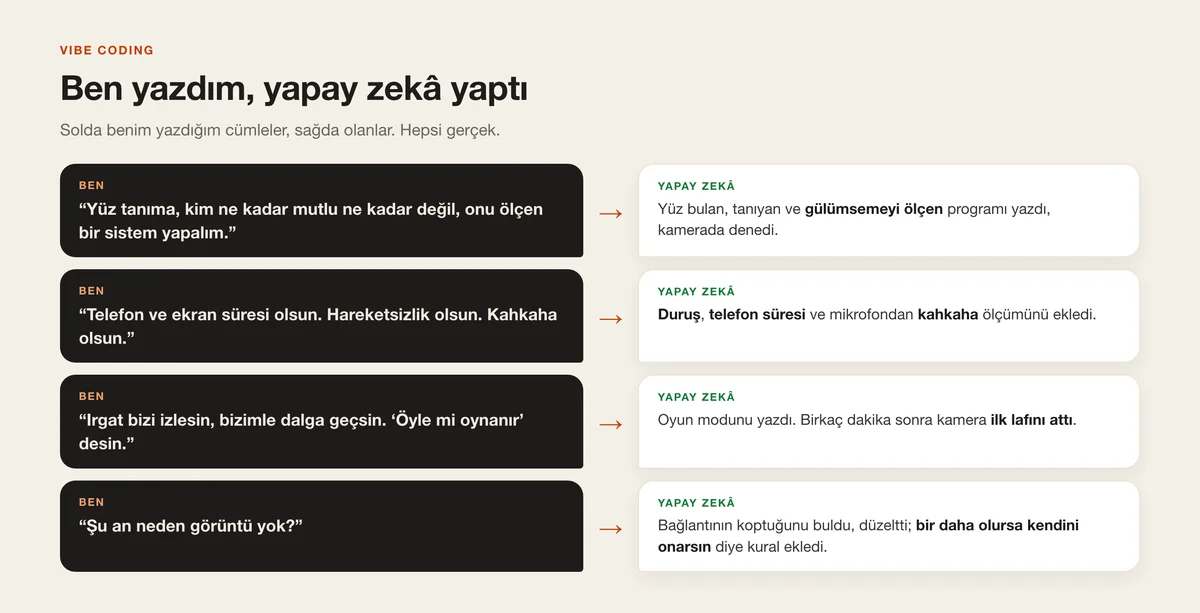
People call this vibe coding. You write what you want in normal sentences; the AI writes the code, runs it and shows you the result. If it didn't work you say what you see, and it fixes it. I used Claude Code; it runs on my computer and creates the files itself. The first sentence I typed was: “Face recognition, who's how happy and who isn't, let's build a system that measures that.” The rest arrived one sentence at a time. I didn't write a single line of code. But I wasn't idle either: I tested at every step and said what was wrong.
4. Have it find the faces
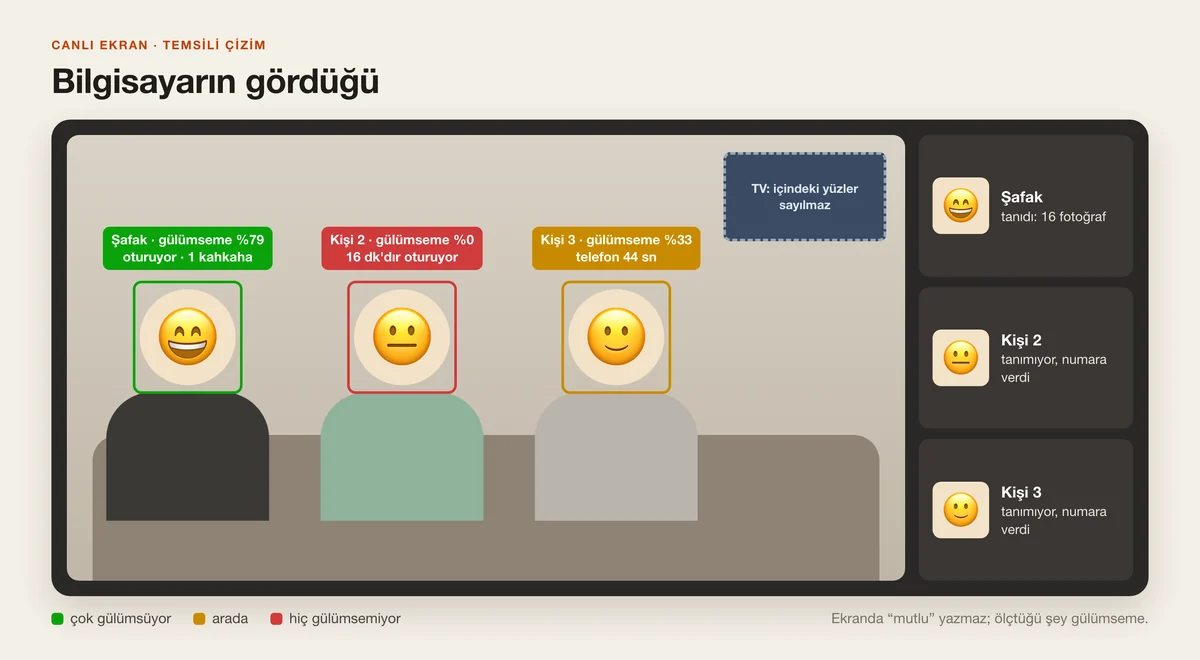
The first job is finding the faces in the picture. There's a ready-made, free model for that; the AI downloaded it and wired it into the program on its own. The computer looks at the frame 10 times a second and draws a box around every face it finds. Two funny mistakes came up. First: it took the faces on the TV for people in the room. I said “don't count the faces inside the TV”; now it finds the TV and ignores whatever is in it. Second: it took a pile of clothes on the sofa for someone sitting there. I had it raise the confidence threshold and that fixed it.
5. Who is who?
Finding a face isn't enough; you also need to know whose face it is. I introduced myself with 16 photos, and 3-5 photos will do. When the program sees a face it compares it with those photos. People it doesn't know get numbers, “person 1”, “person 2”; you can give them names later. This happens entirely on the computer. Neither the photos nor the camera's frames are sent anywhere.
6. Have it measure smiling
Now the main part. The program reads each face's expression 5 times a second and checks whether it's smiling. Then it adds up the minute: in how many of that minute's readings were you smiling? That night I scored 79% in one minute. A friend of mine was at 0% in some minutes. On screen, each face has its name and this percentage above it.
This number isn't happiness. The program sees the smile on your face; it doesn't know what's going on inside. That's why I had the screen say “smile %”, not “happy”.
7. Posture, phone and laughter
Three more things come out of the same system. Posture: the program finds the body's joints, tells whether you're sitting or standing, and counts how many minutes you've stayed put. Phone: is there a phone in your hand or a laptop on your lap, and for how long did you look at it. Laughter: this one comes from the camera's microphone, not the picture. No audio is recorded; the program only notes “laughter” or “no laughter”. From that night's records: I laughed once; one friend hadn't got up for 16 minutes, and in one minute had spent 44 seconds looking at their phone.
8. Make it heckle: game mode
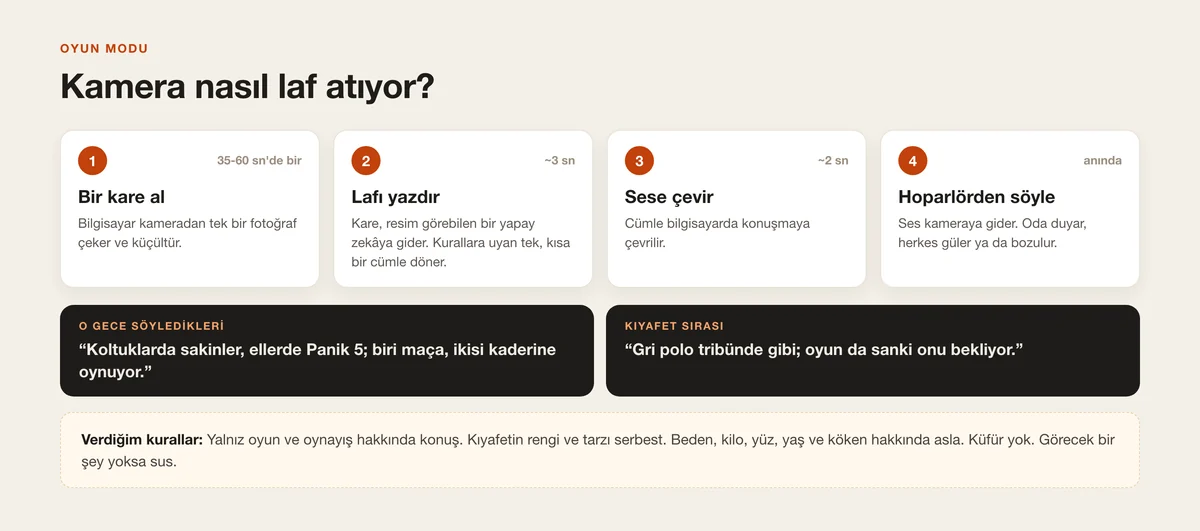
Irgat is the name I gave the assistant in my camera. In the middle of the game I typed one sentence: “Have Irgat watch us and make fun of us. Have it say ‘is that how you play?’” A few minutes later the camera started talking. How it works is simple: every 35-60 seconds the computer takes a single frame from the camera and sends it to an AI that can see images. That AI writes a short line that follows the rules; the computer turns it into speech and plays it through the camera's speaker. One of the first lines: “Did all three of you fail at the same time, or are you taking turns?” Then I said “have it comment on our clothes now and then”; roughly one line in three became about clothes.
I set the rules: only the game and how people play; for clothes only colour and style. Body, weight, face, age and origin are off limits. If you don't write that down, the fun ends in one sentence.
9. Record it
I wanted a record button so the good moments wouldn't be lost. The first version recorded only the camera's raw picture; the boxes and percentages weren't in it. I said “it isn't capturing the emotion part”; now it records the screen as you see it, boxes and percentages included. Because the camera's microphone hears the room, the lines the camera says end up in the recording too. Recordings stay on the computer, in 5-minute pieces.
10. Three traps I fell into
One: we were at a friend's house and the camera only knew my home Wi-Fi. I connected the camera to my phone's personal hotspot and put the computer on the same hotspot; that worked. This camera can't join a 5 GHz network, so the hotspot has to be on 2.4 GHz. Two: in the middle of the game the picture went away. The connection had dropped and the interpreter program wasn't reconnecting on its own. I had a rule added: “if no data arrives for a minute, restart yourself.” Three: when I set the same system up on a Windows laptop it was slow. The cause was the AI models running on the weak graphics chip instead of the powerful one. Once that was fixed, finding people went from 157 milliseconds to 7 milliseconds.
If something is slow, don't say “make it faster”. Say “how many milliseconds does a frame take, what eats most of the time, measure it”.
11. Privacy: don't skip this step
This camera sees and hears everyone in the room. These are my rules. Everyone in the room knows what the camera is doing; since the camera speaks out loud, there's nothing hidden about it anyway. Faces are processed on the computer and don't leave it; the only picture that goes out is the single frame sent every 35-60 seconds in game mode to be commented on. If you're in someone else's home, ask the host first. When the night is over, delete the guests' face photos and records. And one thing I learned: don't assume you know what the program writes to disk; ask the AI “what does this program record, give me a list”. My assistant turned out to be transcribing what it heard into a log file as well; with guests around, that part needs to be off.
Watching or recording someone without their knowledge is a crime. Monitoring employees like this at work has its own rules. This guide is for your own home and for people who know about it.
12. Have the same thing built
Paste the text below into Claude Code or another AI tool that can write code. Stop at every step, test, and write what you see. For me the first working version took one evening.
Build a system that measures how much the people in a room are smiling, using the picture from my home Wi-Fi camera. Work step by step; run each step and show me the result. Keep everything on my own computer and home network. Never expose the camera to the internet.

1. Picture
- Run go2rtc on my computer and add my camera (my camera's brand and model: WRITE IT HERE). Read the picture from the local address.
- If the picture drops, reconnect on your own. If no data arrives for 60 seconds, restart the bridge.

2. Faces
- Look for faces 10 times a second with an open-source face detector (e.g. YuNet). Work out whose face it is with an open-source recognizer (e.g. SFace).
- Recognize me from 3-5 photos I'll put in a "faces/<name>/" folder. Call people you don't know "person 1, person 2"; let me name them later.
- Don't count faces inside the TV. Keep the confidence threshold high when counting people.

3. Smiling
- Read each face's expression 5 times a second. Compute a "smile percentage" for each minute and write it to a small database.
- Don't write "happy" on screen, write "smile %". This is not a happiness measurement.

4. Posture, phone, laughter
- Use a pose model to tell whether a person is sitting or standing and how many minutes they've stayed seated. Count time spent with a phone in hand or a laptop on the lap.
- Recognize laughter from the camera's microphone. Do NOT record audio; keep only "laughter: yes" or "no".

5. Live screen
- Make a page that opens in the browser: the picture, a box around each face, the name and smile percentage above it.
- Add a button that records this screen to video together with the camera's sound.

6. Game mode (optional)
- Every 35-60 seconds take a single frame, send it to a model that can see images, have it write a friendly jab of at most 20 words, and speak it through the speaker.
- Rules: only about the game and how people play; for clothes only colour and style. Never about body, weight, face, age, gender or origin. No swearing. If there's nothing to see, stay quiet.

7. Privacy
- Face photos and records stay on my computer only. Give me a list of everything the program writes to disk.
- Add one command that stops everything, and one that deletes a given person's records.

Speed: after each step measure how many milliseconds a frame takes and tell me. If I have a graphics card, run the models on it; if I have more than one, pick the powerful one.
Tips
- Ask for one thing at a time. Move on only after you've seen it work.
- Don't say “it didn't work”; say what you see: “no picture”, “it counts me as two people”, “it counts the people on TV too”.
- Make it measure. Don't ask “is it fast?”; ask “how many milliseconds per frame?”
- Don't put “happy” on screen; put “smile %”. That's what you're measuring.
- Keep the jabs about the game only. Jokes about looks spoil friendships.
- Don't expose the camera to the internet; keep everything on the home network.
Frequently asked
Does it work with any camera?
It works with cameras that can serve their picture on the home network: brands go2rtc supports, or cameras that expose their own stream address. Making it speak through the speaker is a separate matter; the camera needs two-way audio and go2rtc has to support that on your model. I've only tried it on my own Xiaomi camera.
Does it really measure happiness?
No. It measures the smile on a face. People can smile when they're unhappy and look serious when they're happy; someone concentrating on a game scores 0% and may be having a great time. That's why the screen says “smile %”, not “happy”.
Do my images go anywhere?
Face detection, recognition, smile, posture and laughter measurement all run on the computer; no internet needed. There are two exceptions: in game mode a single frame goes to the vision model every 35-60 seconds to be commented on, and conversations you start with “Hey Irgat” go to the live voice model.
Do I need to know how to code?
No. But you need patience and attention. The AI writes the code; you say clearly what you want, test each step and write what you see. It also walks you through things like opening a terminal.
How much does it cost?
The smile-measurement models are open source and free; they run on your computer. Two things cost money: the subscription for the AI tool that writes the code, and the vision requests in game mode. I didn't separately measure what game mode cost that evening; keep an eye on your own account's usage page.
Is my computer good enough?
On my Mac and on my Windows laptop with a graphics card it takes about 24 milliseconds per frame; the camera sends 20 frames a second, so that's enough. On a weaker computer, the first thing to try is lowering the face search from 10 to 5 times a second.
Is it legal?
As long as you use it in your own home with the knowledge and consent of everyone in the room, it's fine. Watching or recording someone without their knowledge is a crime, and monitoring employees at work has its own rules. This isn't legal advice; if you're unsure, ask a lawyer.