How to make the Stretchy Nose effect?
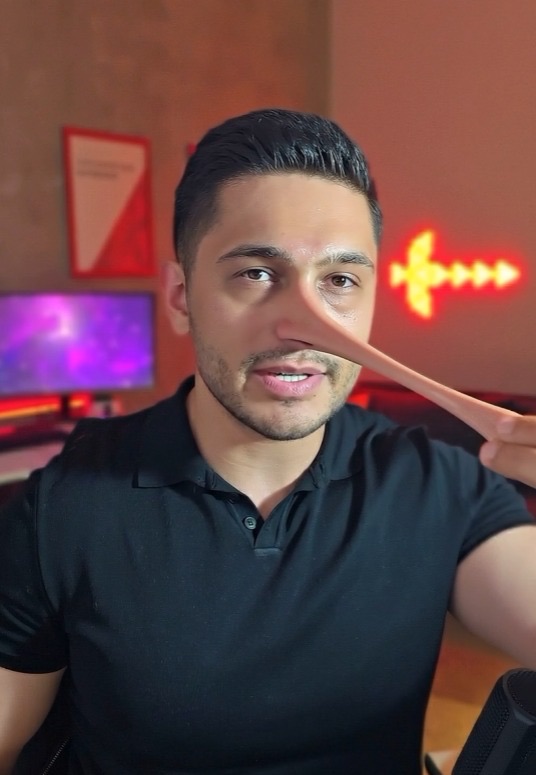
That effect you keep seeing on Instagram: someone grabs their nose, pulls it, and the nose really stretches out like rubber and droops. It isn't a filter — it's AI. You just record a normal 10-second clip and the AI does the rest. Below is every single step, in order.
What you'll need
- A phone (any phone with a camera will do)
- A Google account
- Access to Google Flow — at labs.google/flow
- A clip you shot yourself, 10 seconds max
Step by step
1. Record the clip (10 seconds max)
Prop your phone somewhere steady, frame yourself from the chest up and hit record. Look at the camera and say something if you like. Then bring your fingers to the tip of your nose, pretend to grab it, and slowly pull your hand forward toward the camera — as if your nose were stretching. Let go where your hand ends up, then lower it. Keep the clip under 10 seconds.
This is the part that matters most: move SLOWLY and keep your fingers clearly visible at the tip of your nose. If the AI can't see what your hand is grabbing, the effect won't land.
2. Open Google Flow
Go to labs.google/flow on your phone or computer and sign in with your Google account. I'd suggest using a computer — uploading and downloading is easier there.
3. Choose Omni and upload your clip
Inside Flow, pick Omni. Upload the clip you just recorded and wait for the upload to finish — you'll see a small preview of your video.
4. Paste the prompt
Copy the text below and paste it into the prompt box exactly as it is. Don't change a word and don't translate it — the English version works far better. Every setting of the effect is described inside this text.
Keep the person's exact performance, motion, timing, identity, face, hair, clothing, lighting, background and camera framing unchanged — frame for frame. Turn their pretend nose-pull into a real, exaggerated rubbery cartoon effect — smooth and clean, with no glitching, flickering or warping artifacts. The moment the fingers grip the end of the nose, the nose begins stretching outward, following the hand movement exactly and in sync from the video. As the hand pulls away, the nose stretches long and thin like soft putty, and the surrounding face pulls with it — the nostrils, cheeks and upper lip drawing forward and elongating along with it, the whole centre of the face drawn out into a long tapering shape. The stretched nose sags and droops downward under its own weight as it gets longer, heavy and slack rather than stiff. When the fingers let go and release, the nose does NOT snap back — it stays stretched and dangles loosely, hanging down under gravity and swinging with a slight wobble before settling. Keep the eyes, identity and skin tone consistent throughout, and keep the mouth movements matched to the original speech. Photorealistic skin texture with cartoon-physics deformation, realistic weight, soft motion blur.
5. Generate and wait
Hit generate and wait. Don't close the page while it's working. When the result arrives, watch it: if your nose stretches, droops and does NOT snap back when you let go, it came out right.
If you don't like it, generate again without changing anything. Every run gives a different result; usually 2-3 tries get you there.
6. Download and share
Download the video, move it to your phone and post it as a Reel. You can add music and text inside Instagram itself.
Tips
- Never go over 10 seconds. The effect breaks down on longer clips.
- Don't hold the phone in your hand — prop it up. Keep the camera still.
- Keep the background simple. Busy backgrounds confuse the AI.
- Light your face. In a dark clip the tip of the nose isn't readable.
- Pull in one slow motion without letting your hand leave your nose. Sudden moves ruin it.
- No glasses, masks or anything else covering your face.
Frequently asked
Is it free?
Generating video in Google Flow spends credits, and how many you get depends on your plan. You'll see your own allowance in the panel once you sign in.
Can I do it from my phone?
Yes, you can. But uploading and downloading is more comfortable on a computer.
Can I write the prompt in Turkish?
I wouldn't. The English version gives noticeably better results. Just hit copy and paste it as is.
Does it mess up my speech?
No. The prompt tells it to keep your mouth movements matched to the original speech and to leave your face, clothes and background untouched. Only the nose changes.
My nose snaps back — what should I do?
You probably pasted the prompt incomplete — paste all of it, including the final sentences. Also keep recording for 1-2 seconds after you let go, so the AI has room to show the droop.